CARE

How Aupaire Pro works

Bring your skills.
Build your future.

Begin with the website waitlist or register directly in Aupaire Pro. Complete the review, then manage your care work in one professional app.

The people behind care

Professional skills.
A human connection.

From everyday routines to specialised support, thoughtful care begins with a human connection.

A female childcare professional with a young girl beside a flower-filled window.
ChildcareTheir little world. In caring hands.

01 / 10

Childcare · Their little world. In caring hands.

01 / THE JOURNEY

Start with you.

Register directly in Aupaire Pro to complete your application. If you prefer our team to contact you first, Join the professional onboarding wait list.

Create your account

Register in the Pro app and follow the contact-verification steps.

Build your profile

Add your care specialties, experience and preferred work areas. All applicants need at least a bachelor’s degree; education, early childhood education and related fields are preferred. Nursing applicants also need a valid licence.

Set your availability

Choose the areas you serve and the times you are available.

Aupaire Pro registration screen

Demo images

Safety starts before care

Trust.
On both sides of the door.

Professional screening. Client identity verification. A care community built on knowing who you are welcoming – and who is welcoming you.

AUPAIRE PRO · IDENTITY CHECK

Aupaire PRO KYC screen showing identity document, selfie capture, face matching and liveness

Demo images

SCREENING BEFORE ONBOARDING

Care begins
with confidence.

Professionals apply online and complete the required checks before joining Aupaire.

  • 01
    Identity & KYC

    Document, face-matching and liveness checks.

  • 02
    Interview & credentials

    Face-to-face assessment and professional qualification checks.

  • 03
    Health fitness

    A health fitness certificate as part of the review.

  • 04
    Criminal records

    Checks before professionals are onboarded.

AUPAIRE CARE · IDENTITY CHECK

Aupaire CARE KYC screen showing identity document, selfie capture, face matching and liveness

Demo images

TRUST GOES BOTH WAYS

We verify
clients, too.

Care professionals deserve peace of mind, too. Specialist KYC technology helps create a safer environment for everyone.

  • 01
    An identity document

    A valid ID or passport establishes who is joining.

  • 02
    A live selfie

    Face matching and liveness connect the person to their document.

  • 03
    Privacy & consent

    Clear verification instructions and consent before proceeding.

Demo images

02 / THE JOURNEY

A profile built
on verification.

Complete the required vetting before your professional profile goes live.

Identity and credentials

Complete identity / KYC verification and upload the university certificate and credentials required for your services. Nurses must provide a valid professional licence.

Schedule your interview

Once your profile and identity verification are complete, schedule your interview from your dashboard in Aupaire Pro. Complete the interview and the required credential, health fitness and criminal-record checks before onboarding.

Approval and eligibility

Approval depends on the review outcome. Once approved and eligible, your profile can receive relevant opportunities.

Aupaire Pro approval screen, with demonstration profile

Demo images

03 / THE JOURNEY

More ways
to be found.

As an independent professional, you shape your work in Aupaire Pro. After vetting and onboarding, keep your profile, availability and preferred work areas up to date.

Flexibility starts with your availability.

Manage working hours, booking notice and breaks around your existing commitments. Once confirmed, a visit is a professional commitment.

Receive opportunities

Clients can book you directly through your profile, and Ask Aupaire can shortlist you. Enable AutoMatch to receive suitable requests based on your services, availability and preferred work areas.

Review before responding

Check the service, location, timing, and booking details. Respond within the window shown in the app.

Prepare for the visit

Keep communication in the app and follow the booking’s arrival and check-in instructions.

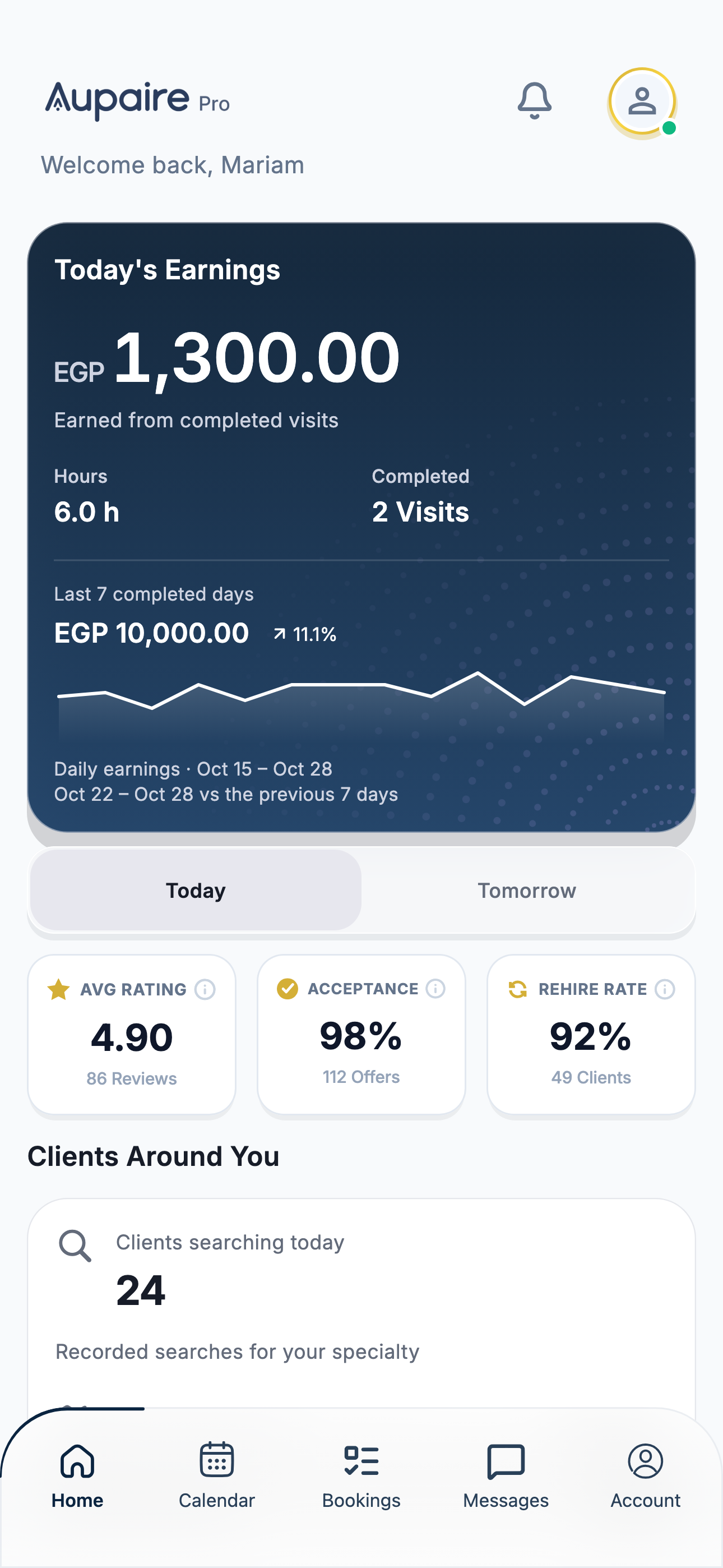
Aupaire Pro home screen with demonstration earnings, visit activity and professional metrics

App preview · Illustrative demo amounts—not actual or guaranteed earnings.

Demo images

04 / THE JOURNEY

Arrive with clarity.
Care with focus.

Manage the journey to your client, the care visit, and completion in one place.

Navigate to your client

Open the route from the booking. Keep arrival status up to date so your client can follow your journey.

Confirm the visit

Follow the arrival steps and use the client’s visit PIN when prompted. Complete care and confirm the end of the visit.

Track your progress

Review completed visits, feedback, quality and punctuality. Your earnings and payout status are tracked after each completed session. Payouts follow the weekly schedule shown in Settings, under Payouts, and are sent to your saved bank account or personal wallet.

Aupaire Pro visit completion screen, with demonstration data; mockup prices or earnings are obscured and are not current or planned rates

Demo images

SECURE PAYMENTS · ESCROW PROTECTION

Payment protection.
Confidence for both.

Professionals know their fees are secured before the visit. Clients know their funds are held safely until the agreed care session is complete. Clear terms and payment status for both sides.

  1. 01Fees secured
  2. 02Care as agreed
  3. 03Clear payment status

For eligible prepaid home visits. Payment, refund and dispute terms apply.

Payment terms
A care professional and child smiling during a video check-in
The family member checking inClient
A little hello. A closer connection.Video check-ins, inside Aupaire.
Demo images

All inside Aupaire

Keep families close.
While you care.

A conversation with your client. A reassuring video hello. Keep families connected to their loved ones through Aupaire Pro.

Message

Coordinate your confirmed visit in the app. Keep practical details and care conversations together.

Voice

Speak directly with your client through an in-app call.

Video

During care, connect by video so families can see their loved one and check in with you.

Personal numbers stay personal.

Use in-app chat and calls without exchanging personal phone numbers.

A little more clarity.

Do I set my own service prices?

Aupaire sets service prices. Review the booking details and the earnings information displayed in Aupaire Pro.

How do I start receiving booking opportunities?

Complete the required vetting and onboarding, then publish your professional profile with your services, availability and preferred work areas. Clients can book you directly. If you enable AutoMatch, you can also receive suitable requests that match your services and working preferences.

Where do I manage my work?

Use Aupaire Pro for your profile, availability, requests, visits, and earnings. The Care app is for clients arranging care.

AUPAIRE PRO · EXPERIENCE CERTIFICATE

Build a career.
Keep a record of it.

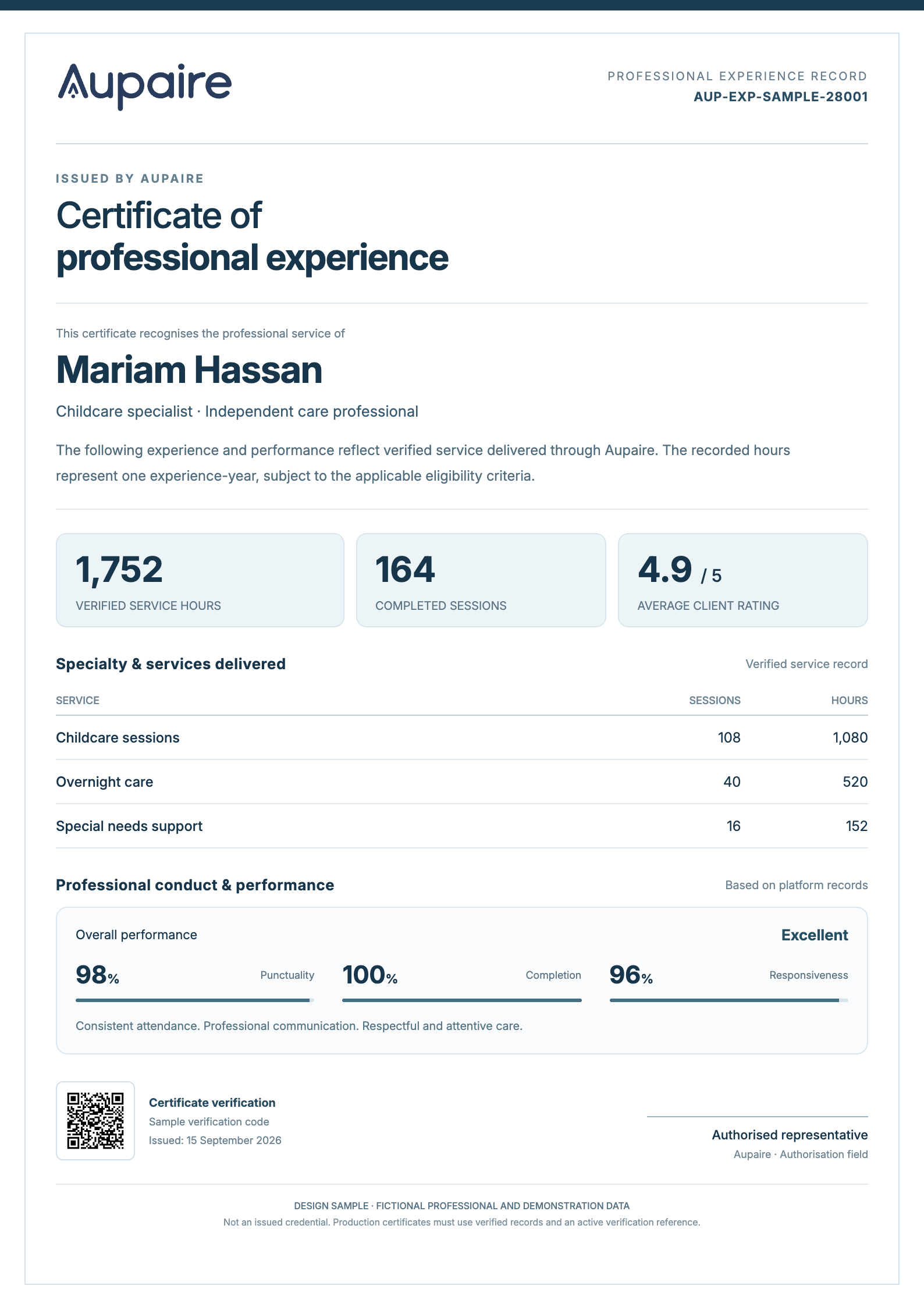
Every eligible hour brings you closer. Unlock your Aupaire experience certificate after one year of verified service hours - and carry your professional story forward.

One experience-year is based on verified service hours, not time since registration. Eligibility and issuance requirements are shown in the app. The certificate does not replace professional qualifications or licences.

PRO

Experience certificate

Certificate unlocked

One year of verified service experience.

EXPERIENCE MILESTONE REACHED1,752Verified service hours
164Completed visits
4.9 / 5Client rating

A record worth sharing.

Your hours, the services you delivered and feedback on your work, brought together.

Illustrative issued-certificate example

Demo images

Two apps. One connection.

Your next step starts here.

Scan with your phone, or open your app store.

For families

Aupaire Care

Find care, book a visit, and keep everything together.

Scan to download Aupaire from the App Store
iPhone & iPadApp Store

Find “Aupaire” in your app store.

For care professionals

Aupaire Pro

Apply, manage opportunities, and track your work.

Scan to download Aupaire Pro from the App Store
iPhone & iPadApp Store

Find “Aupaire Pro” in your app store.

We continue to introduce services over time. Current options depend on your location and professional availability.

App preview · Illustrative demo amounts—not actual or guaranteed earnings.